Stay on top of your projects with our newly redesigned portal
The RenoAssistance contractor portal is getting a makeover! Designed with our Verified Contractors in mind, the new platform will soon feature a more intuitive interface and improved features.
Starting September 3rd, you’ll be able to manage quotes with ease, track the progress of your projects in real time, and enjoy a smoother invoicing process. And that’s not all! Submit your application for projects that interest you in just a few clicks.
How to log in
Starting September 3rd, you’ll be automatically redirected to the new portal.
I have a HomeExpress account
You don’t have to do a thing! Your username and password will stay the same, and you can continue to manage your projects as usual.
I have a RenoAssistance account
Starting September 3rd, you must create a new password the first time you log in.
Enter your username on the login page and click on the “Create a new password” link. Follow the on-screen instructions to access the new portal.
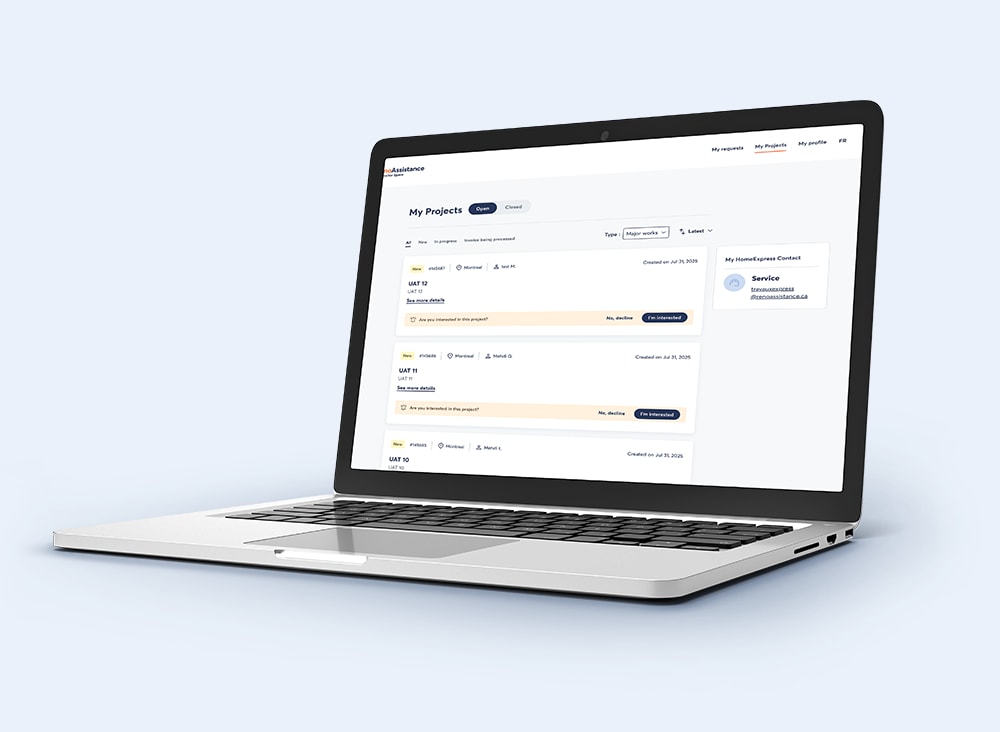
Less admin, more projects
Spend less time on administrative tasks and more time doing what you do best! Discover how the new Contractor portal makes managing your projects easier than ever.

Manage all your projects in one place
The “My projects” section has been redesigned to provide a simple and efficient experience thanks to
well-organized project cards to quickly access key information.
an intuitive tagging system to view the status of each project, whether new, ongoing, or being invoiced.
clear calls to action to submit your application for projects that interest you.
Everything you need to boost your business!

Send your quotes and invoices in just a few clicks
The new project cards feature all the information you need to submit your application for a project. No need to look elsewhere!
Once you have been awarded a project, you can easily share documents with your clients, from the initial quote to the final invoice.
All your documents, always within reach!
Need help?
If you have any queries or need technical support, feel free to contact us. Your dedicated account manager will be happy to answer your questions.